
Create, personalize, and deliver audio ads with Voxify Studio.
Turn a script, webpage, product brief, or existing recording into a production-ready audio creative. Choose voices and sound, edit on a synchronized timeline, personalize with live data, then publish the right version for every listener.
How Voxify Studio works
Start simple and add production or decisioning controls only when the campaign needs them.
- StartBring a script, brief, webpage, or recording.
- CreateShape one or more messages with AI assistance.
- CastChoose voices, music, and sound effects.
- ProduceEdit, mix, master, preview, and download.
- PersonalizeAdd criteria, listener context, POIs, or feeds.
- DeliverSelect the right record and creative at request time.
Choose your path
Your first audio ad →
Create a project, write a script, add a voice and music, synthesize, and download a finished spot.
Draft with AI Writer →
Start from a product brief or webpage URL, then review the generated script before producing audio.
Refine the creative →
Use Enhance, Recommend, Rephrase, or Dubbing when the script needs a specific next step.
Build a dynamic campaign →
Adapt words and assets using criteria, listener context, POI lists, weather, or sports data.
Deliver at scale →
Configure and test record and creative selection, set request parameters, then publish a version for live delivery.
Core concepts
Project, creative, variant →
A project is the campaign workspace. Creatives are message alternatives. Variants are rendered outcomes.
Script and timeline →
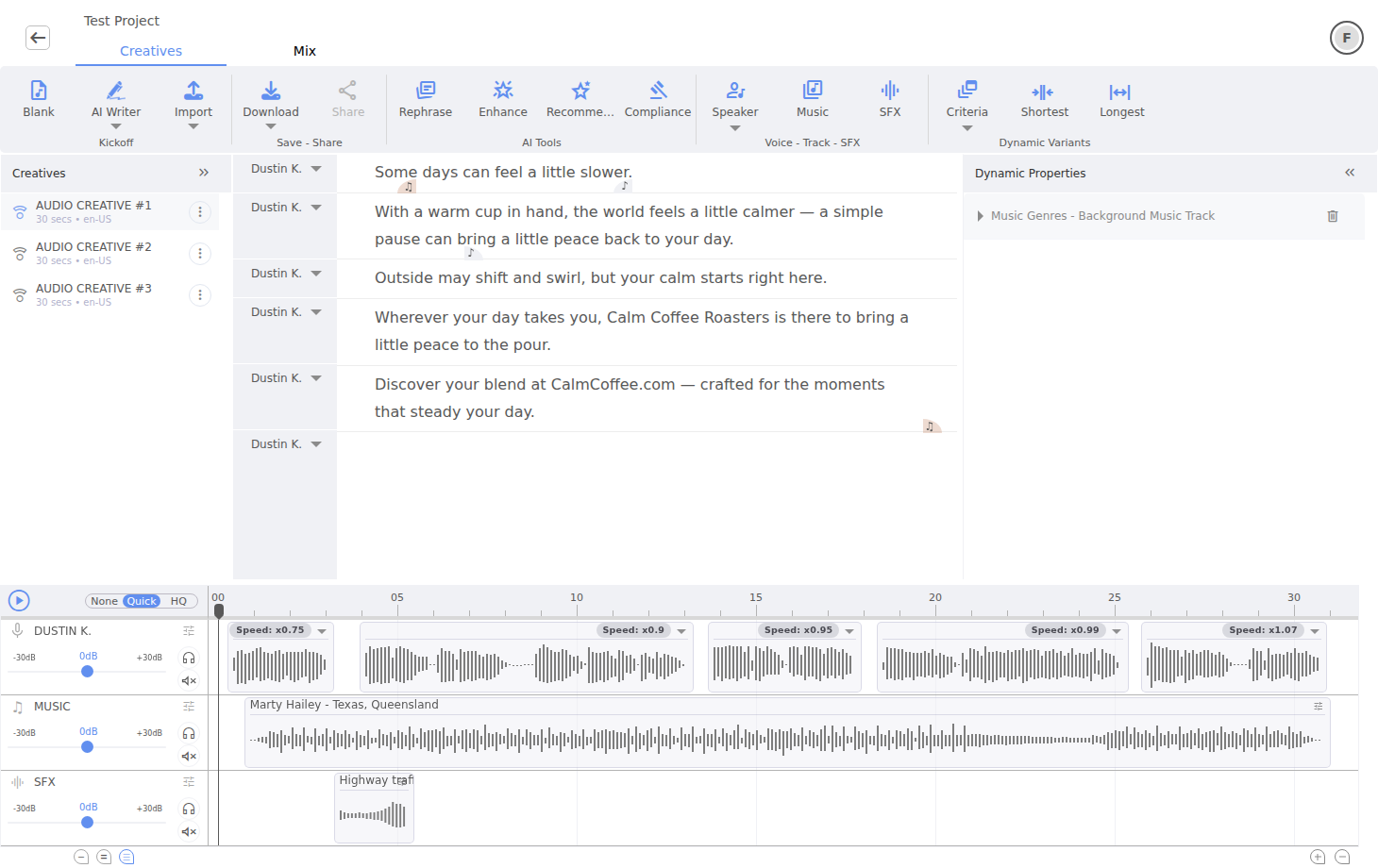
Every spoken paragraph is linked to a vocal clip; music and SFX live on their own synchronized lanes.
Dynamic content →
One section of a script can hold multiple values selected from context, data, or a rule.
Record and release →
A selected record supplies data for a request; a published version fixes the configuration used for live delivery.
Browse by capability
- Script editing — structure copy and keep speech aligned.
- AI Writer — develop a draft from a brief or webpage.
- Voices — browse, upload, design, or clone a voice.
- Music — find, upload, or generate a soundtrack.
- Sound effects — search, generate, and place SFX.
- Mixing — control lanes, clips, effects, and ducking.
- Mastering — set loudness, peak, reference, and export.
- Multi-creatives — build alternatives without losing the original.
- User Context and data tokens — speak listener date, location, weather, POI, or feed values with explicit formats and safe fallback behavior.
- POI lists — create geographic datasets for personalization.
- Creative decisioning — rotate, sequence, or choose conditionally.
- Record decisioning — filter, score, rotate, or pick candidates.
Start creating
Follow the quickstart for a complete first run. It deliberately avoids advanced personalization so you can learn the project, script, synthesis, and export workflow before adding rules.