
Make one creative respond to context.
Dynamic content gives a selected part of the script a controlled set of alternatives. Data tokens are different: they insert a formatted fact from User Context, a POI list, a data collection, or a feed record.
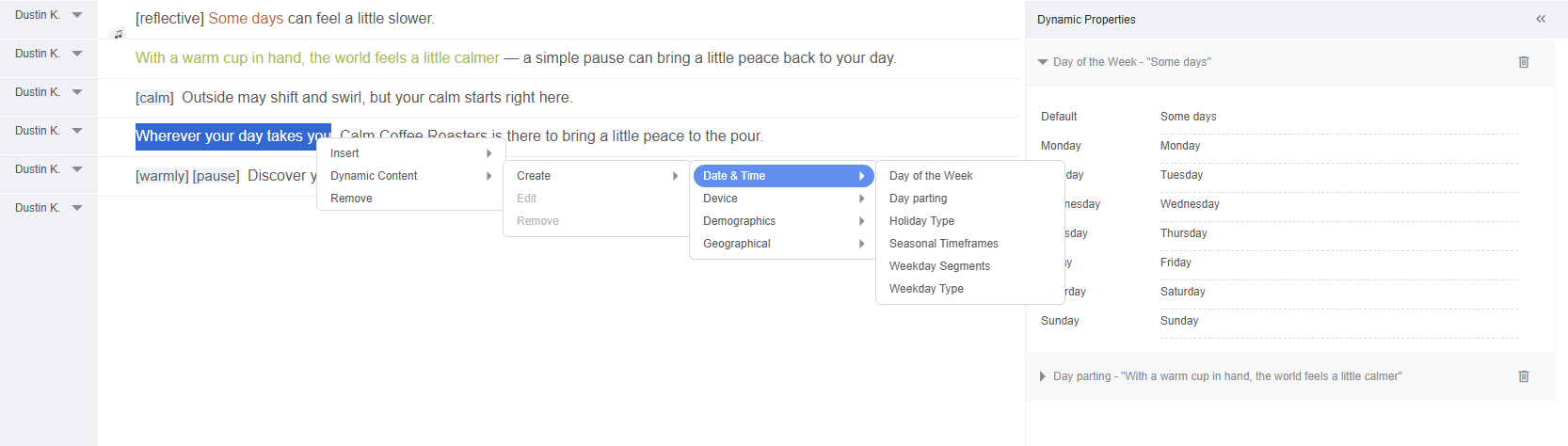
Dynamic text versus data tokens
| Use | Choose it when | Example |
|---|---|---|
| Dynamic content | You control a finite set of approved alternatives. | “this morning” / “this afternoon” / “tonight” |
| Data token | You want to insert a value from context or a selected record. | Listener city or the chosen store name |
| Separate creative | The message structure, argument, duration, or production treatment changes substantially. | Family offer versus commuter offer |
Create dynamic text from a selection
- Highlight the exact word or phrase in the script.
- Right-click the selection.
- Choose Dynamic Content → Create.
- Select a criterion family and criterion, for example Date & Time → Day of the Week.
- Review the generated options and default.
- Open Dynamic Properties to edit values and configuration.
The selected words become a protected dynamic segment. Its criterion, option IDs, values, and default travel with the creative.
Available criterion families include Date & Time, Geographical, Weather, Device, Demographics, and Music Genres. Choose Custom… when a partner sends a named value with the ad request. The available choices depend on the selected criterion and deployment data. A demographic or listening-genre choice needs the corresponding partner signal; the platform does not infer it from the listener's voice or device.
Design safe alternatives
- Every option must fit grammatically into the surrounding sentence.
- Keep claims and legal meaning equivalent unless a separate approval path exists.
- Avoid options with radically different spoken lengths unless the timeline is designed for them.
- Make the default valid when context is missing, late, or unsupported.
- Listen to the complete sentence for every high-impact option.
Preview an option
Open the Criteria menu in the Creatives tab, point at the criterion, and choose the option to preview, or Default. The script updates to show that value so you can inspect grammar and timing. The same menu chooses the listener location and the record that data tokens preview.
Dynamic assets
The same principle can select a music track, sound effect, or pre-recorded vocal clip by criterion. In the audio editor, right-click a music track and choose Dynamic Track → Create; a pre-recorded vocal clip offers Dynamic Content → Create. Configure and audition each option with its matching text.
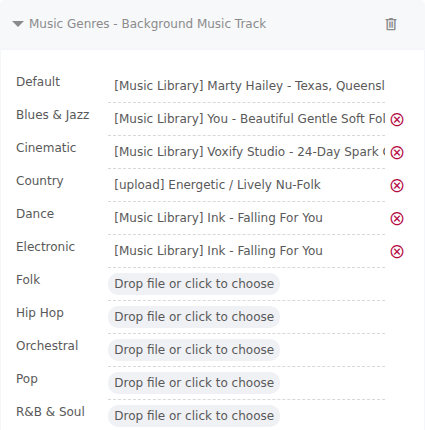
- Choose and license every candidate asset.
- Set a production-safe default.
- Keep durations and loudness close enough for the shared arrangement.
- Preview every branch with the relevant dynamic text.
- Use a separate creative when the arrangement must change substantially.
Combine dynamic content carefully
Multiple dynamic segments multiply the number of possible outcomes. Prioritize combinations that can occur together and verify the expected variant count before Download All.
- DefaultWrite a complete default option.
- CriterionAdd one business decision.
- OptionsApprove every alternative.
- TokensBind only required fields and choose each spoken form.
- PreviewTest representative combinations.
- DeliveryTest the rules for typical and edge-case listeners.
Dynamic QA checklist
- Default option copy is complete and compliant.
- Every option has an explicit meaning.
- No combination breaks grammar or claim accuracy.
- Spoken timing remains within inventory limits.
- Asset rights cover all branches.
- A creative without the data token, or No ad, covers requests where a token's value is missing.