
Put an audio-ad creator inside your own product.
The Voxify Embedded SDK is a drop-in JavaScript component that gives your users a complete,
self-serve flow for making personalized audio ads — write or generate a script, pick a voice and a
track, master, and export — without ever leaving your app. One create() call, no build
step. Your authentication, your branding, the exact feature set you choose.
Why embed Voxify
Audio production is hard to build and harder to staff. The SDK lets you ship a polished creative experience in an afternoon and keep your users — and their data — inside your own product.
Ship in an afternoon
A stylesheet, a script tag, and one create() call. No bundler, no audio expertise, no DSP to maintain. The same engine that powers the Voxify platform, on your page.
Keep users in your product
Your customers create ads where they already work instead of bouncing to a third-party tool. You own the surrounding experience; Voxify just powers the creative step.
Your brand, your scope
Set your primary colour, choose which tools appear, and decide what users can do. The editor blends into your UI rather than feeling bolted on.
You stay in control of identity
Your backend mints short-lived tokens for each end user. No long-lived secret ever lives in the browser, and every project is scoped to the user you name.
What you can build
Every integration uses the same SDK. What changes is which tools you expose and which capabilities you turn on — all configured visually in the Embed Builder.
Self-serve creative tool
Give users the full flow: a script editor, the audio timeline, AI Writer to start from a URL or product brief, and Recommend to pick voice and track. They compose an ad end to end.
One-shot ad generator
Expose only a kickoff tool. The user pastes a landing-page URL or a product description; the SDK generates a finished spot and surfaces it for review. Minimal surface, maximum payoff.
Personalized campaigns
Turn on dynamic content and the same creative adapts its copy — and optionally its music — per city, demographic, or any criterion you define. One spot becomes a campaign that scales.
Multi-creative workspace
Let users keep several variations side by side in one project — ideal for A/B testing or tailoring one brief to multiple audience segments.
What's in the box
The embedded editor carries the production-grade creative flow your users get on the Voxify platform:
- AI script generation — from a landing-page URL or a short product brief.
- Creative variations — spin off alternative scripts for A/B testing.
- Voice & music recommendations — matched to the script, ranked and ready to audition.
- Script Enrichment — gives the script a more expressive, natural read on demand.
- Dynamic content — per-audience copy, voices, and tracks.
- Auto-mastering — broadcast-ready loudness and EQ before export.
- Multi-creative projects — several variations in a single workspace.
- Persistence — optionally save every ad into your Voxify dashboard.
How integration works
Three moving parts, and the Embed Builder writes most of it for you:
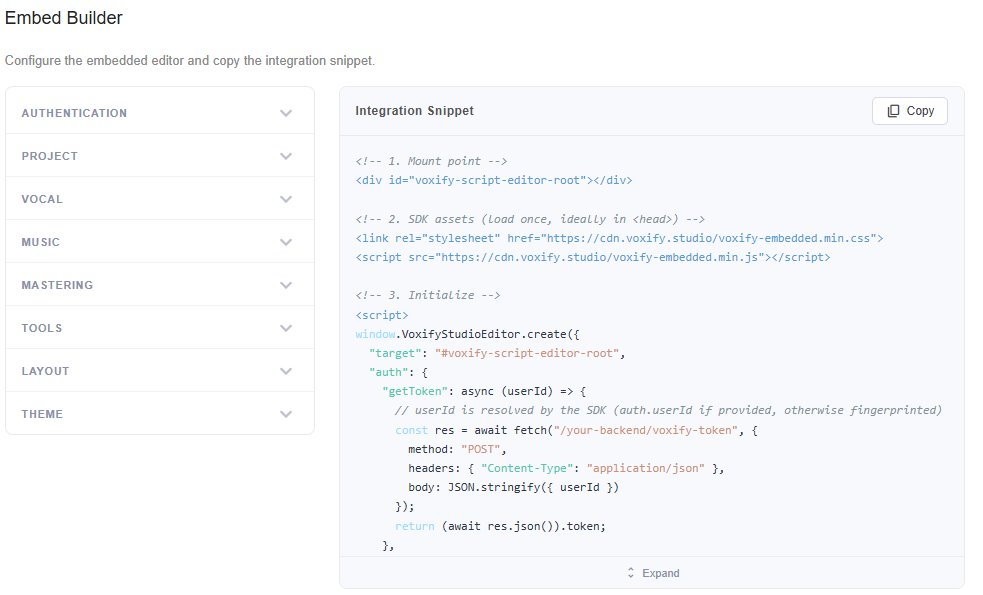
- Configure in the Embed Builder. Inside the Voxify platform, open the Embed tab and tune every option visually — authentication, tools, layout, theme. It generates a ready-to-paste snippet that contains only the settings you changed.
-
Paste the snippet. Drop the stylesheet, the script tag, a mount element, and the
generated
VoxifyStudioEditor.create({…})call onto your page. -
Wire your token backend. The snippet's
authcallbacks point at two of your endpoints. Each calls Voxify'sPOST /v1/auth/tokenserver-to-server and returns a short-lived bearer token. Your API key never touches the browser.
Get started
Quickstart →
Mount the editor on a page in under 5 minutes. Load the bundle, add a mount point, paste the snippet.
The Embed Builder →
How the visual configurator works, the anatomy of the generated snippet, and the live preview.
Configuration →
Every option, section by section — what it does, when to use it, and how to set it.
Live demo ↗
See the real embedded editor running live — anonymous, no setup. A deliberately minimal embed you can try right now.
Versioning & support
The SDK is served from an evergreen URL on the Voxify CDN. Breaking changes ship behind versioned URLs and are announced in the Changelog. Integration help, feature requests, and issues: support@voxify.studio.