
Quickstart
Mount the Voxify editor on a page in under 5 minutes. Three steps: load the bundle, add a mount target,
and call create() with your auth callbacks.
publicKey and a backend endpoint that can mint short-lived session tokens
for your end users. If you don't have those yet, see Authentication —
you can still follow this page using the sandbox token below.
1. Load the bundle
Add the stylesheet and the script to your page. Both are served from voxify.studio on an
evergreen URL — there's no build step.
<link rel="stylesheet" href="https://cdn.voxify.studio/voxify-embedded.min.css" />

<!-- Material Symbols + Font Awesome (used by editor toolbar icons) -->
<link rel="stylesheet"
      href="https://fonts.googleapis.com/css2?family=Material+Symbols+Outlined:opsz,wght,FILL,GRAD@20..48,100..700,0..1,-50..200" />
<link rel="stylesheet"
      href="https://cdnjs.cloudflare.com/ajax/libs/font-awesome/6.5.2/css/all.min.css" />

<script src="https://cdn.voxify.studio/voxify-embedded.min.js"></script>
The script tag exposes window.VoxifyStudioEditor and sets
window.__VOXIFY_EMBEDDED_MODE__ = true so the bundle knows it's running outside
the platform app.
2. Add a mount target
The editor mounts into a four-cell layout: a top toolbar, a left creatives panel, a right properties panel, and a center script editor. You provide the wrapper:
<div class="border-layout" style="padding:10px">
  <div class="north" style="min-height:10px"></div>
  <div class="west" style="min-width:100px"></div>
  <div class="east" style="min-width:100px"></div>
  <div id="voxify-script-editor-root" class="center"></div>
</div>
Pass the #voxify-script-editor-root selector as target to
create(). You can use any selector or DOM element — the four-cell wrapper is required only
if you want the toolbar / side panels in their default positions.
3. Call create()
The SDK needs two things: where to mount, and how to authenticate. Auth is a pair of callbacks you
provide — the SDK calls getToken once on init, and refreshToken later if the
token expires. Both should hit your backend, not Voxify directly.
window.VoxifyStudioEditor.create({
  target: '#voxify-script-editor-root',

  auth: {
    getToken: async (userId) => {
      // Call YOUR backend, which calls Voxify's /v1/auth/token with your publicKey.
      const res = await fetch('/api/voxify/token', {
        method: 'POST',
        headers: { 'Content-Type': 'application/json' },
        body: JSON.stringify({ userId }),
      });
      const data = await res.json();
      return data.accessToken.token;     // string Bearer token
    },
    refreshToken: async (expiredToken) => {
      const res = await fetch('/api/voxify/refresh', {
        method: 'POST',
        headers: { 'Authorization': 'Bearer ' + expiredToken },
      });
      return (await res.json()).accessToken.token;
    },
  },

  layout: {
    height:    '600px',
    westWidth: '244px',
    eastWidth: '30%',
  },
}).then(editor => {
  // Editor is mounted. `editor.projectId` is stable for this session.
  console.log('Voxify ready. projectId:', editor.projectId);
}).catch(err => {
  console.error('Voxify create() failed:', err);
});
That's it. The editor is now mounted and your end users can start a script.
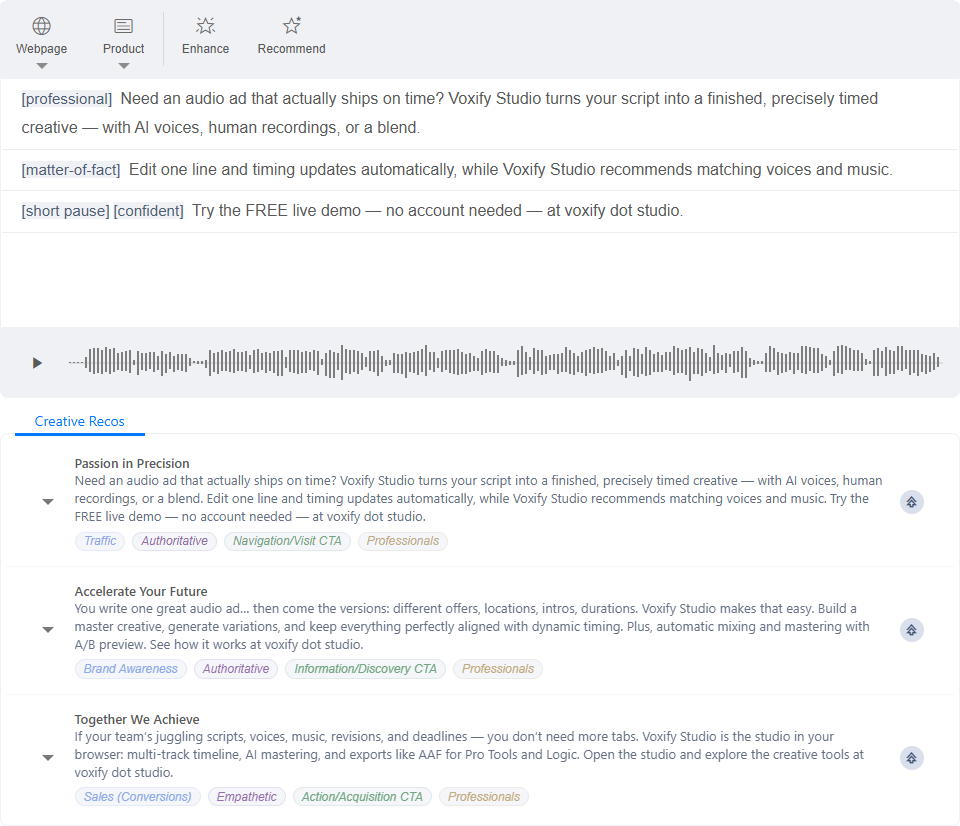
What just happened
- The SDK called your
getTokenwith the resolved user ID (auto-generated from a device fingerprint if you didn't pass one). - It opened a session against
/embedded/sessionusing the returned Bearer token, and hydrated permissions for that end user. - It built the three-panel layout and the toolbar, and returned an
editorhandle withprojectId,flush(),getCreatives(), andenhance()methods. - From now on, every request the editor makes to
/v1/*carries the Bearer token. If a request 401s, the SDK calls yourrefreshTokenautomatically and retries.
See it running first
Want to see the editor live before you wire up a backend? The free demo runs the real embedded editor right on the page — no account, no setup on your side. It's a deliberately minimal embed: just the Webpage and Product kickoff tools plus Enhance, in a compact layout — a good feel for the leanest useful configuration. To build the matching snippet, use the Embed Builder.
Common pitfalls
The editor doesn't appear
- Check the browser console —
create()returns a Promise that rejects with a descriptive error if auth or DOM setup fails. - Make sure the element matched by
targetexists in the DOM before you callcreate(). The SDK does not poll. - Confirm the CSS file is loaded. Without it the editor mounts but renders unstyled — easy to miss because the script editor still works.
401 on every request
- Your
getTokenmust return either a string or{ token, type }. Anything else is treated as a failure. - The token must be issued for the same
publicKeythe Voxify account expects. Mixing dev and prod keys is a common gotcha.
CORS errors from /v1/*
The SDK calls Voxify's API directly from the browser; Voxify allows requests from any origin by
default, but if you proxy the endpoints through your own backend make sure the proxy passes through the
Authorization header.