
Shape the script and its spoken structure.
The script editor is not only a text box. Paragraphs define vocal clips, protected elements hold data and audio instructions, and every relevant edit stays connected to the timeline.
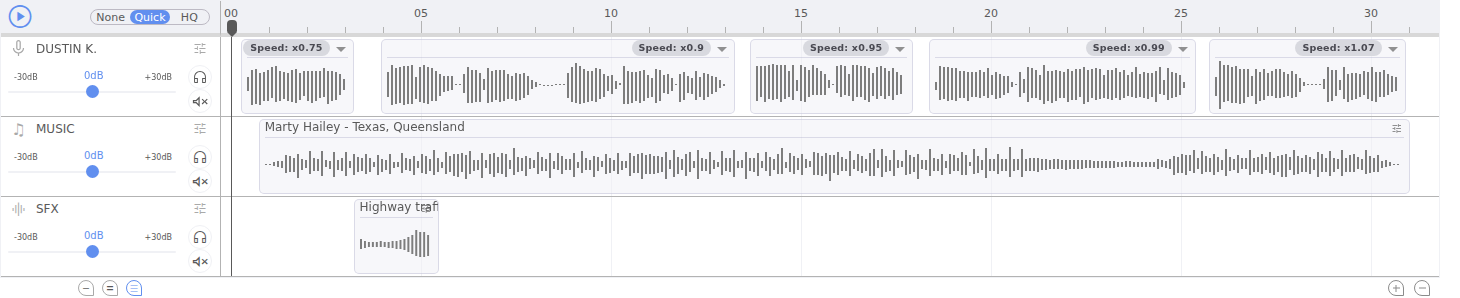
Paragraphs become vocal clips
Use a paragraph break when a sentence group should be edited, cast, positioned, or synthesized as one vocal unit. Studio creates and maintains the matching clip on the Vocal lane.
- Edit text directly inside a paragraph.
- Press Enter to separate content into another spoken paragraph.
- Remove an empty paragraph only when you also intend to remove that vocal unit.
- Use the timeline to control exact timing between units.
Edit without losing synchronization
When text changes, Studio updates the linked vocal model and marks previously generated speech as stale. Music and SFX are not regenerated by a text edit, but their timing may need a second look if the new vocal duration changes.
- Edit the copy.
- Confirm the stale state on the affected vocal.
- Synthesize the changed section again.
- Review downstream timing in the timeline.
Select text for contextual tools
Highlight a word or phrase before opening the context menu. The selection becomes the target for tools such as Dynamic Content and criteria creation.
- Drag across the exact text.
- Right-click the selection.
- Choose the relevant action.
- Complete the dialog or nested criterion menu.
For data insertion at the caret, type { instead. The data token picker opens without replacing surrounding text.
Protected elements
Dynamic tokens, criteria pills, and supported audio instructions are treated as structured elements. Studio limits partial edits, unsupported paste operations, and drag-and-drop changes that would leave their configuration incomplete.
- Select the full element before replacing it.
- Edit its configuration in Dynamic Properties when available.
- Do not paste formatted content over a token or criterion.
- After a large paste, verify paragraph breaks and vocal clip count.
Pre-recorded speech
Imported audio can create a PreRecorded vocal with transcript text. Treat it differently from generated speech: editing the transcript does not rewrite the recording. Replace or re-import the audio when the spoken performance itself must change.
Writing for generated speech
- Punctuation — use it to make intended phrasing unambiguous.
- Numbers — write them as they should be spoken when pronunciation matters.
- Names — test brand and place names before producing all variants.
- Alternatives — keep dynamic options grammatically compatible with their surrounding text.
- Length — judge the spoken duration, not character count alone.
- Review — always listen after changing voice, language, or dynamic wording.
Before leaving the script
- Confirm every visible paragraph is intentional.
- Check that protected tokens still show as complete elements.
- Resolve any stale vocals needed for the next preview.
- Play through transitions where paragraph timing changed.