
Use AI as a creative co-pilot.
Start by shaping the script's spoken rhythm, then add audio tags where the voice needs direction. Enhance can suggest cues across the script; Recommend helps choose voice and music. Rephrase, Dubbing, and Compliance support later editorial decisions.
Choose the right tool
| Tool | Use it when | Expected result |
|---|---|---|
| Audio tags | The voice needs a specific emotional or rhythmic direction. | Manually placed, highlighted performance cues in the Script Editor. |
| Enhance | The copy is settled, but its delivery needs expressive guidance across the script. | Suggested audio tags, emphasis, and pacing punctuation in the current creative. |
| Recommend | You have a script and want a coordinated production direction. | Composition choices with voices and music to audition and select. |
| Rephrase | You want different writing directions for the same message. | Three proposed treatments; the chosen one becomes a new creative. |
| Dubbing | You want the current spoken version in another language or accent. | A new creative with recorded dubbed voice clips at the source clip positions. |
| Compliance | You want an assisted review for potential advertising issues. | Issues and recommendations to review, not an automatic legal approval. |
Shape the script's delivery
How you write the script influences the read. Standard punctuation gives speech a natural rhythm, an ellipsis can add a pause and weight, and selective capitalization can emphasize a word. Start there when the wording is right but the delivery needs adjustment.
Audio tags
For a specific emotional or performance direction, type a short, free-text audio cue in square brackets at the point it should take effect, for example [excited], [matter-of-fact], or [short pause]. Studio highlights the cue; supported synthesis treats it as direction rather than spoken copy. Preview the result, since a cue's effect depends on the voice and surrounding text.
Other cues can request a whisper, laugh, sigh, or a short sound such as applause. Singing and accent directions are more experimental, and you can combine tags. Audition each result with the chosen voice. For richer sounds such as rain against a car window, ocean waves, or crickets, use a separate sound-effect clip.
Enhance
Use AI Tools → Enhance when the wording is ready but the spoken read could benefit from delivery cues. Enhance adds audio tags, emphasis, and pacing punctuation to the current creative; it does not present a choice of rewrites. The action is available once the current script has at least 15 characters.
- Review the script and select the creative you want to enhance.
- Choose AI Tools → Enhance and wait for the processing dialog to close.
- Read the updated text and check the tags and emphasis in context.
- Regenerate affected voice audio, then use Sync & Play to judge the actual performance.
For dynamic content, Enhance processes each editable wording, including criterion alternatives, in place. Data token values provide context but are not rewritten. Recorded voice clips are skipped because changing their transcript cannot change the recording. A plain single-speaker script may be repartitioned into paragraphs, so check clip boundaries and timing afterwards.
Recommend
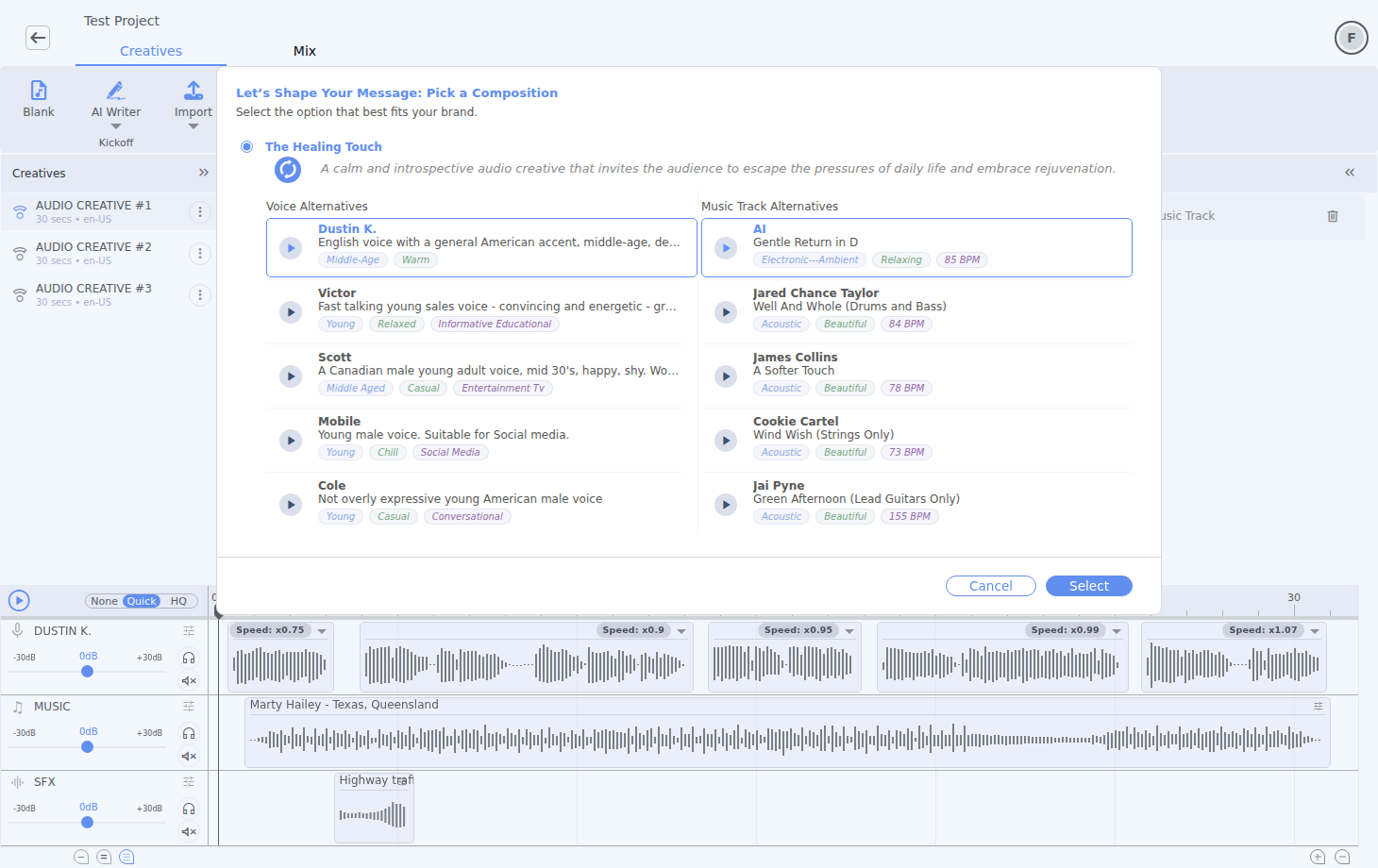
Recommend analyzes the current script and proposes coordinated compositions: voice choices for each speaker, music, and a suggested vocal entry time. The action is available once the current script has at least 15 characters.
- Choose AI Tools → Recommend and wait for the composition results.
- Compare the directions, then select a composition card to inspect its voice and track alternatives.
- Audition individual voices and tracks, or play a composition preview. Where offered, choose an English accent to rerun the recommendation.
- Choose the voices and music you want within that direction, then click Select.
- Use Sync & Play to check the full creative and refine the result on the timeline.
When the first vocal clip still has its default one-second start, Recommend can adopt the proposed start. A start you have moved yourself remains in place. The selected recommendation can also update the music bed and lane level; inspect those changes after applying it.
Rephrase
Rephrase classifies the current script and offers three alternative treatments, each with a title, draft, and campaign tags. The source remains available when you choose a result.
- Select a creative with at least 15 characters of script, then choose AI Tools → Rephrase.
- Wait for the three directions, then compare their copy and campaign goal, tone of voice, target audience, and call to action.
- Select a card to enable Choose. Customize opens controls for those dimensions, plus occasion, promotion, and message or contact details. Its Next action does not yet produce a customized result in this Studio flow; use Previous and Choose on one of the original proposals.
- Review the new creative. Rephrase splits its draft into vocal paragraphs; assign a voice and check the timing before synthesis.
- Rename the result to make its strategic difference clear.
Dubbing
Dubbing makes a new spoken version of the selected creative. It copies the music, sound effects, and clip positions, then places recorded dubbed voice clips where the original voice clips were. Use it after approving the source message.
- Select a creative that contains spoken vocal text, then choose AI Tools → Dubbing.
- Check or change Source language, and choose a different Target language. Available languages come from the service catalogue; dialect or accent variants may be listed separately.
- Review the estimated credits for the current voice content and click Confirm.
- Wait for processing to complete, then select and play the newly created creative.
- Review pronunciation, translation, pacing, music alignment, and the new creative's name before delivery.
Compliance
Choose AI Tools → Compliance to run an assisted review of the current script and campaign context. Results may flag claim wording, disclosures, category-specific concerns, or areas that deserve human review.
A reliable AI workflow
- BriefDefine audience, offer, proof, tone, and duration.
- DraftWrite the message or use AI Writer to develop a starting point.
- ExploreUse Rephrase when alternatives are useful.
- CastUse Recommend to align voice and music.
- RefineEnhance the chosen script.
- ReviewRun Compliance and complete human approval.
- LocalizeUse Dubbing after approving the source performance.
Credit and review discipline
- Review any displayed credit estimate before confirming an operation.
- Avoid repeating the same request while a job is still running.
- Name useful outputs immediately so alternatives remain traceable.
- Check AI output for factual claims, pronunciation, and brand consistency.