Platform

A connected system for audio advertising.

Move from brief to finished creative, dynamic variants and delivery logic without breaking the connection between script, sound and context.

One project modelCreatives, records, assets, criteria and delivery configuration stay connected.
Human + AI workflowGenerate and recommend quickly, then edit, replace and fine-tune the result.
Studio, SDK or APIUse the workspace directly or bring the creative engine into your own stack.
01 · Create

Start with a script — or ask Voxify to build the first composition.

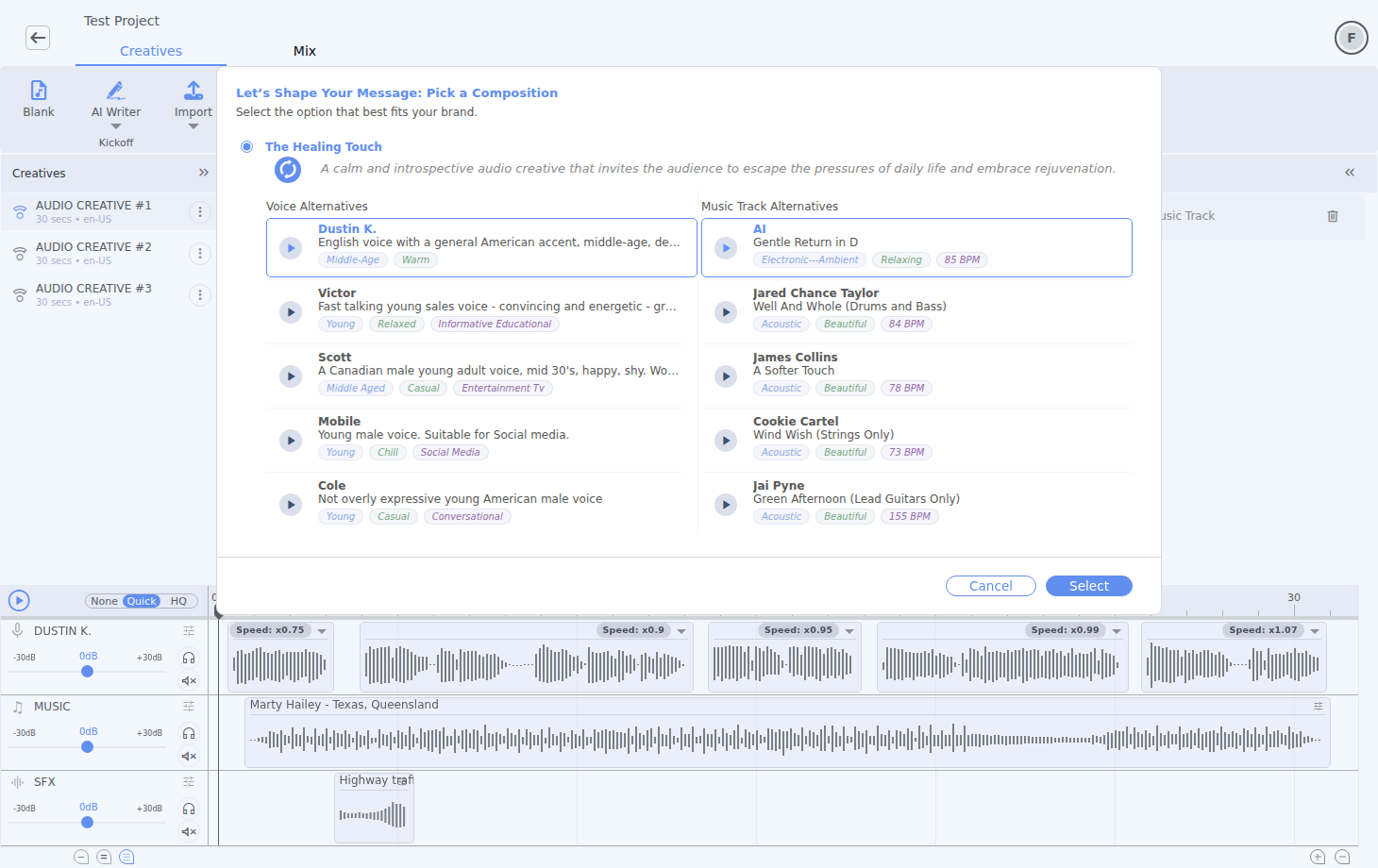
Provide a script, a landing-page URL or a product pitch. The Recommend workflow combines creative variations with suitable voices and music, while Rephrase and Enhance refine the angle and performance.

  • Three proposed compositions from the same brief or script.
  • Alternative messages tuned by goal, tone, audience and CTA.
  • Expressive performance cues added without locking the text.
  • Multiple creatives kept inside the same project for comparison.
Recommended creative compositions with voices and music in Voxify Studio
02 · Produce

Script and sound remain synchronized.

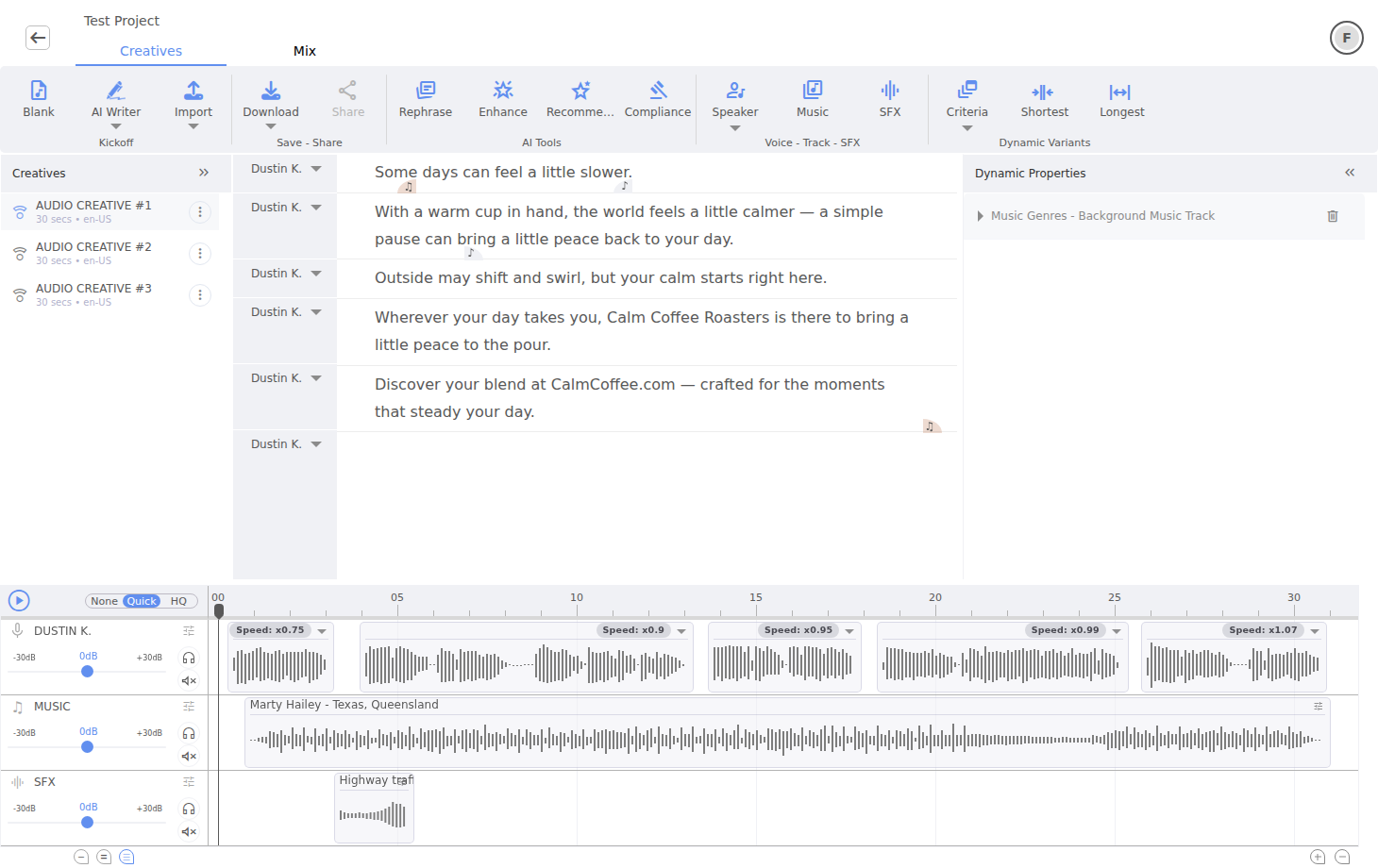
Edit a line, change a speaker or adjust a clip on the timeline. Composition logic keeps timing understandable while still allowing the direct manipulation expected from an audio editor.

  • Multiple speakers with a dedicated vocal lane per voice.
  • AI and recorded vocals in the same creative.
  • Music and SFX libraries, generation and user uploads.
  • Move and resize vocal, music and SFX clips independently or while preserving synchronized relationships.
Script editor and synchronized multi-track timeline
03 · Personalize

Type {. Connect the script to live context.

Voxify treats runtime data as a first-class part of the creative. Insert a visible token directly in the script, choose its source and format, preview a resolved value, then let Delivery resolve it again for the actual listener or event.

User context

Personalize from request and listener context without writing a separate script: date and time, location and live weather are available from the same { picker.
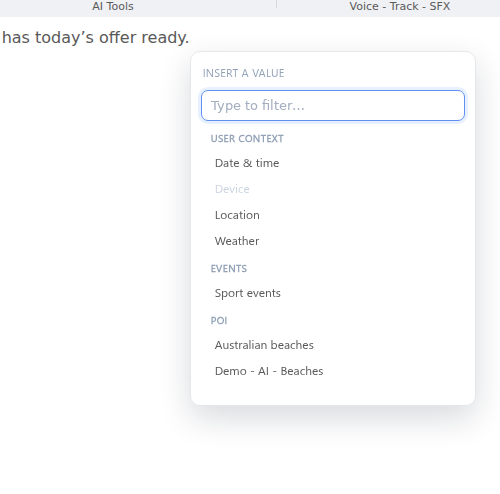
Date & time · Location · Weather
The script editor value picker showing user context, event and POI sources

POI lists

Reuse locations managed in Listings. Speak the selected place, its own properties or location-aware weather — while the record-selection policy decides which POI wins.
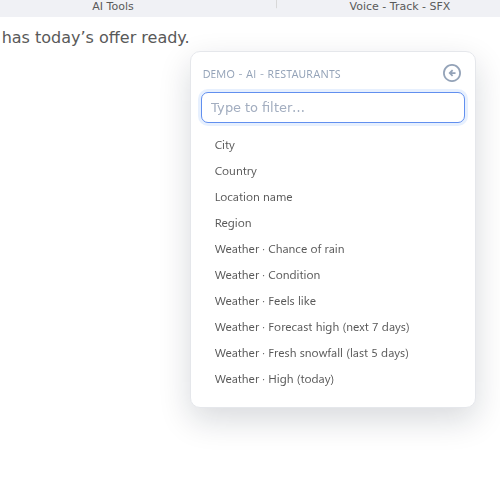
Place fields · Properties · Weather
POI token options including city, country, location name, region and weather

Live sports data

Bind the creative to a sport and selected leagues, then insert teams, venue, date, event or score fields. The spoken value changes with the feed, not with a rewritten ad.
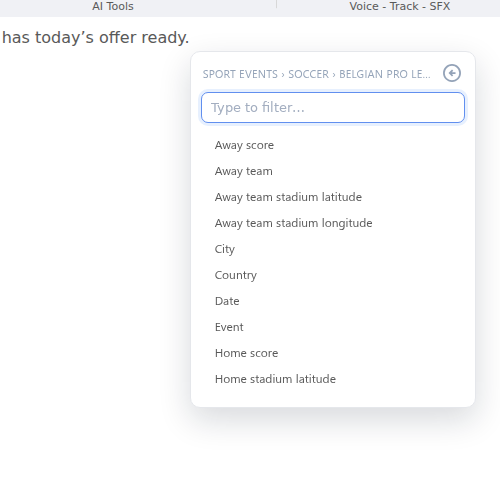
Sport · Leagues · Event fields
Sports data-feed token options for a selected soccer league
POI operations

Build the location set the way the campaign starts.

Begin with a market brief, a single place, a map or the advertiser's existing data. Every path ends in the same reusable POI model, ready for tokens, dynamic properties and Delivery selection.

01

Generate with AI

Describe the locations in natural language, review verified results and refine the scope in the same conversation.

02

New list

Add locations one by one with place search, then enrich them with campaign-specific properties.

03

Pin on Map

Build the set visually, name each pin and adjust its exact position before using it in Studio.

04

Import

Bring CSV or XLSX location data into the same review, geocoding and property workflow.
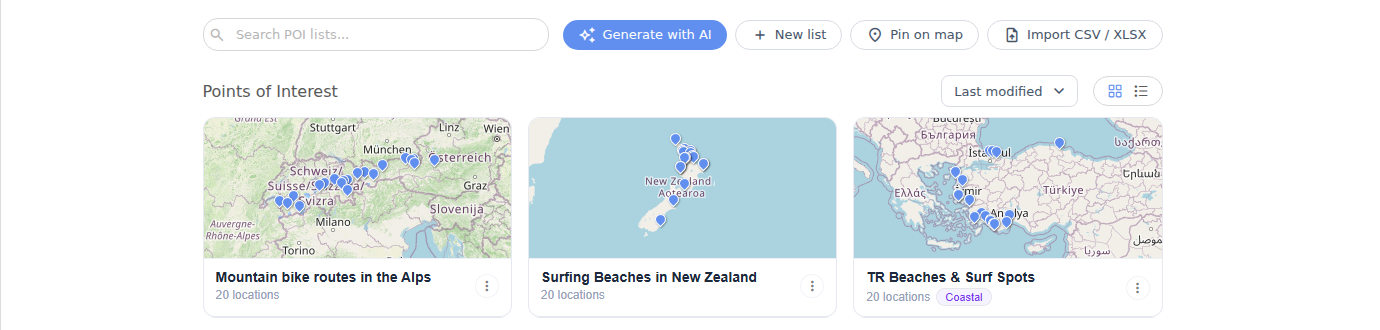
POI workspace with Generate with AI, New list, Pin on map and Import CSV or XLSX options

Four creation paths, one managed POI library that can be reused across campaigns.

Agentic POI creation

Create, inspect and refine the list in a conversation.

The POI agent does more than turn a prompt into names. It proposes the set, resolves locations against a geocoder, exposes verification status and keeps the thread open for follow-up instructions.
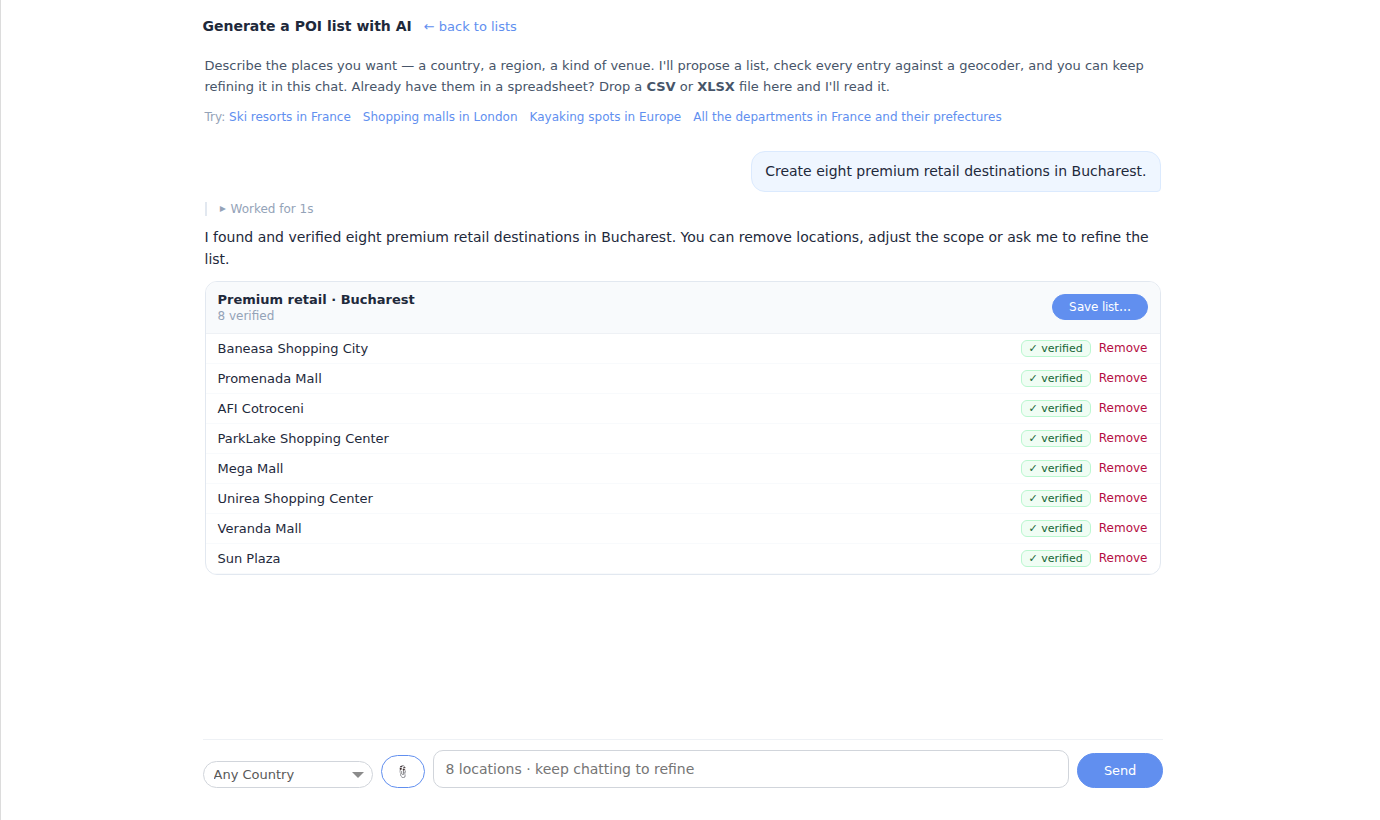
  • Start with a human brief such as “premium retail destinations in Bucharest”.
  • Review verified, approximate, ambiguous or unresolved locations.
  • Remove individual results or refine geography, venue type and scope conversationally.
  • Save the reviewed set as a reusable list with typed custom properties.
POI AI agent conversation proposing and verifying eight retail destinations

Illustrative conversation rendered in the product UI. The user can continue chatting to narrow or expand the result.

Tokens + criteria

Tokens insert values. Criteria create branches.

Use an atomic token when a word or phrase comes from context. Select existing text and open Dynamic Content when the message itself should branch by daypart, geography, audience or another criterion.
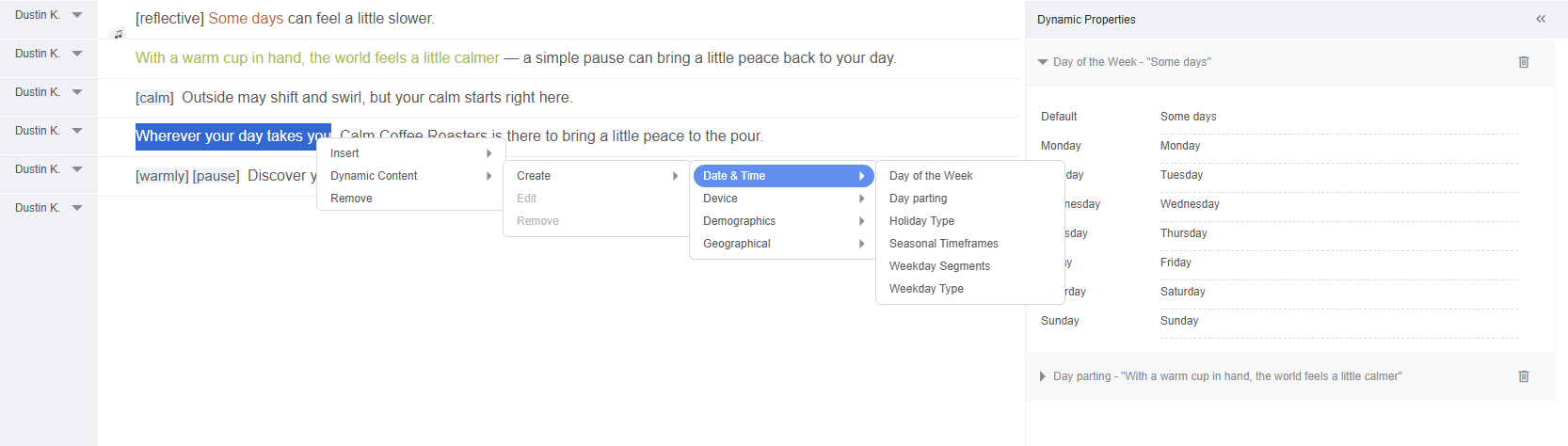
  • Tokens remain visible and identifiable inside the script.
  • Each token carries a speakable format and a preview value.
  • Criteria branches retain a default for unmatched contexts.
  • Combinations can be inspected before synthesis or delivery.
Selected script text being configured with a day and time criterion
A shared model for criteria

Synchronize the words and the sound that accompanies them.

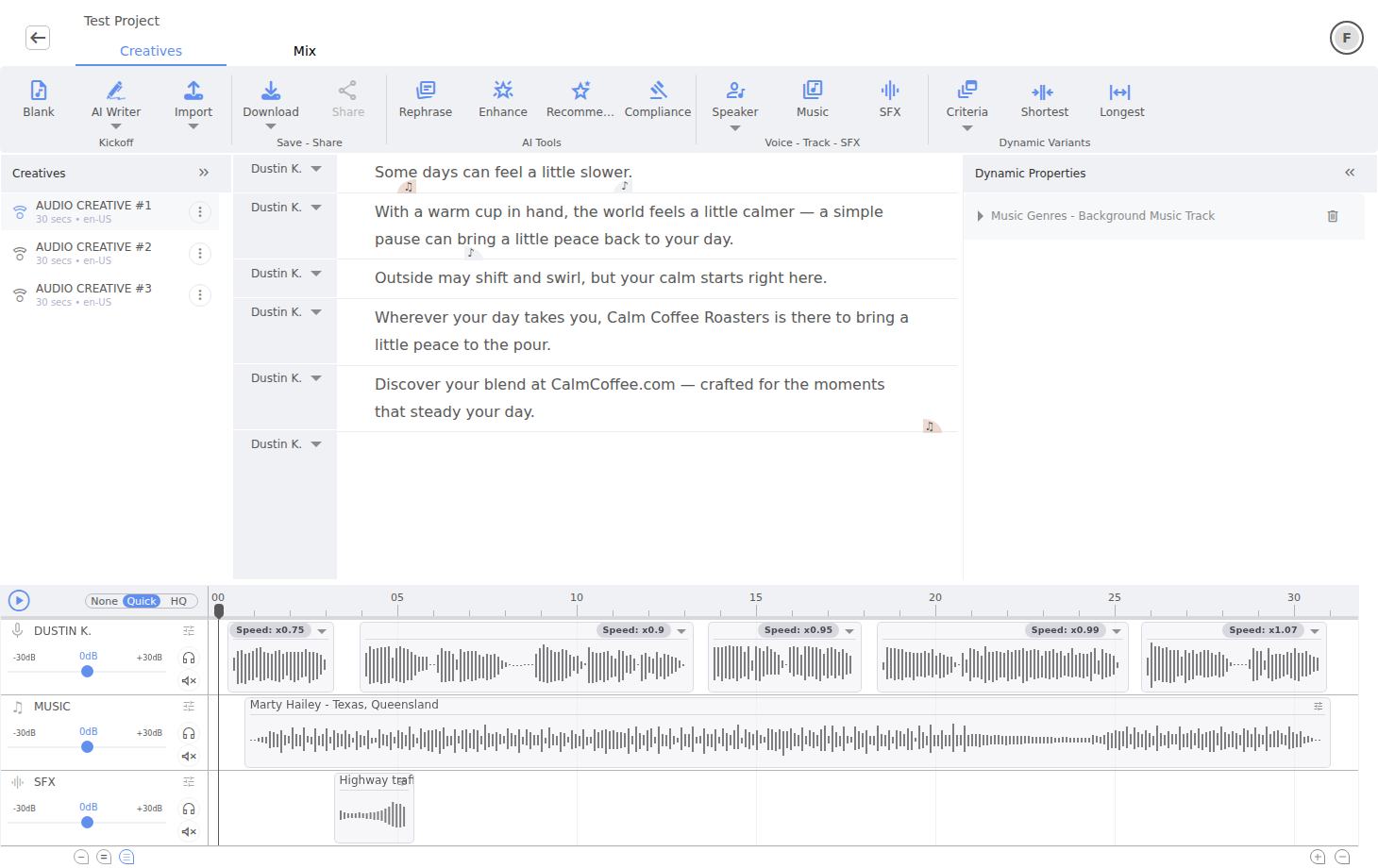
The same contextual options can control script text, speakers, music and sound effects. Dynamic Properties keeps the defaults and every configured record visible instead of hiding personalization behind an opaque generation step.
  • Change vocal, music and SFX assets by criterion.
  • Inspect values and remove incomplete alternatives.
  • Reuse POI and feed fields in authoring and record selection.
  • Preview a chosen combination of criteria in Studio.
Dynamic Properties and synchronized audio creative configuration
04 · Finish

Production control from the smallest clip to the final master.

Start from a production profile, then open exactly the layer that needs attention. Voxify keeps clip processing, lane chains, ducking, the master bus and mastering in one inspectable hierarchy.

Level 01

Clip

Adjust timing, gain, fades, speed and an individual effect chain without changing the whole lane.

Level 02

Lane

Shape vocal, music and SFX buses with reusable presets and dedicated processing chains.

Level 03

Ducking + master

Make music respond to speech, then apply final bus EQ, dynamics, cleanup or spatial processing.

Level 04

Mastering

Target delivery loudness and true peak, optionally using a recommended or custom reference.

Mixing control

Build and inspect the processing chain, effect by effect.

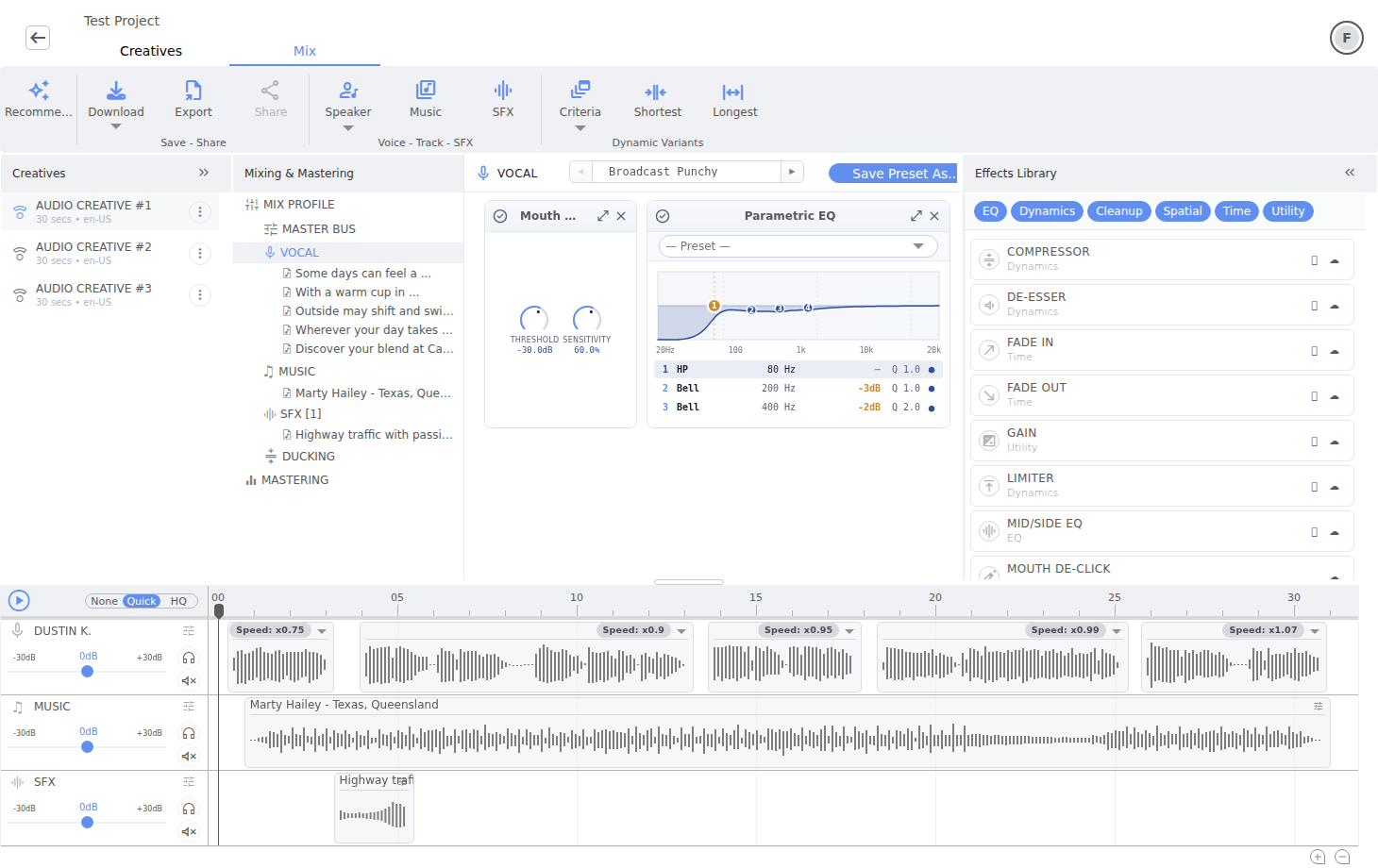
Choose a mix profile for the overall job, then refine individual layers. The Effects Library groups processors by EQ, Dynamics, Cleanup, Spatial, Time and Utility so a producer can add only what the material requires.
  • Open, reorder, bypass or remove processors in a chain.
  • Edit parameters such as thresholds, sensitivity and EQ bands.
  • Save reusable presets for a lane or production style.
  • Keep per-clip fixes separate from lane and master processing.
Vocal processing chain with mouth de-click and parametric EQ controls

A vocal lane with its active processors, editable parameters and the complete effects library.

Mastering + hand-off

Define the delivery target — and compare before committing.

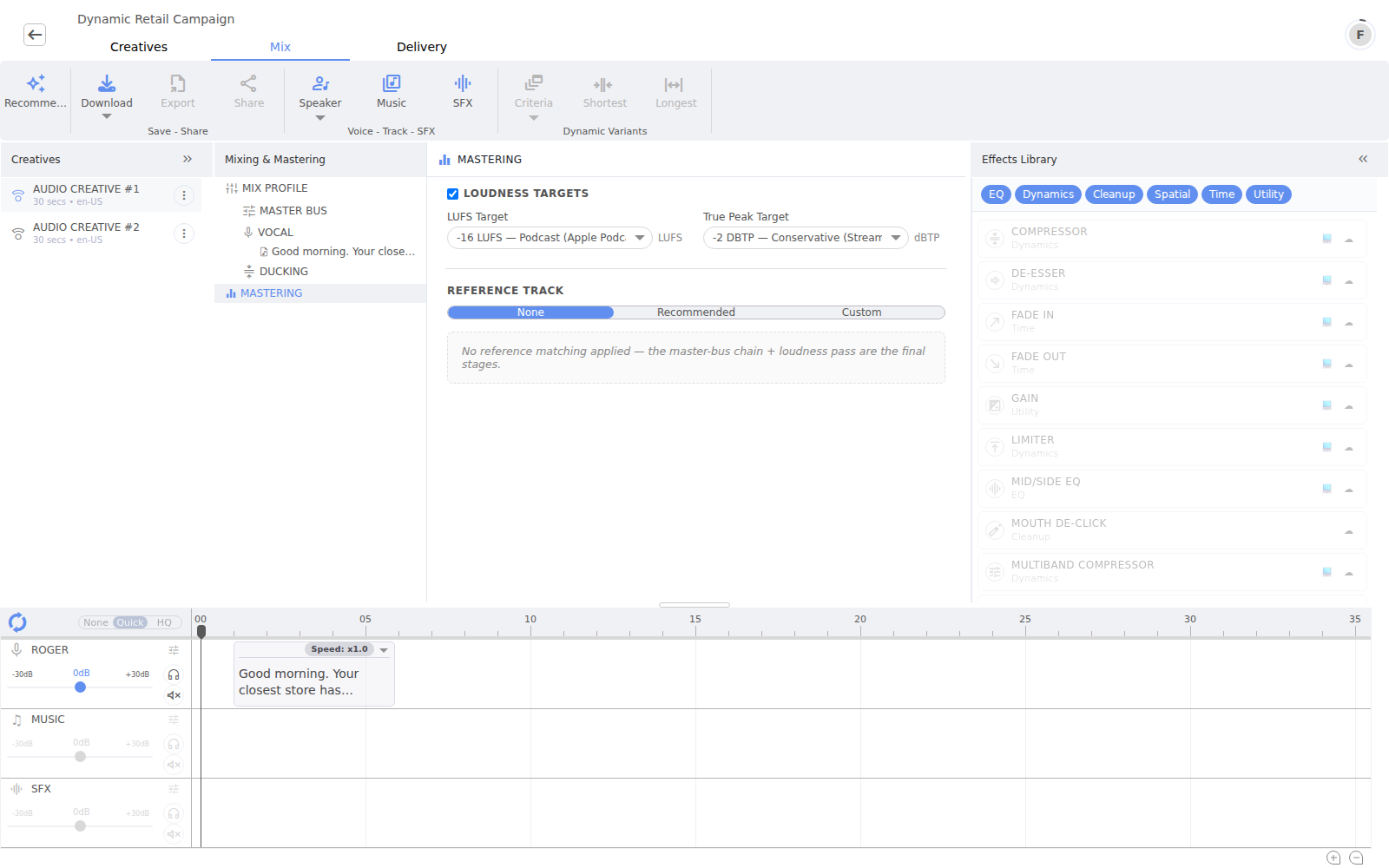
Mastering is an explicit finishing layer, not a hidden enhancement. Set loudness and true-peak targets, choose no reference, a recommended composition or your own track, then compare the result in the player.
  • Configurable LUFS and dBTP delivery targets.
  • None, recommended and custom reference-track modes.
  • Compare unmastered, Quick and HQ versions in a practical A/B review.
  • Finished-audio download and AAF hand-off for compatible DAWs.
Mastering controls for loudness, true peak and reference-track selection

Mastering targets and reference selection remain visible alongside the project hierarchy and timeline.

05 · Deliver

Decide which creative and which record should play.

Delivery separates campaign choice from record choice, so teams can combine explicit rules, contextual recipes, AI-assisted selection and location intelligence without rebuilding the audio.

  • Rotation, full-funnel sequencing and conditional creative selection.
  • Natural-language agents for creative conditions and record-selection policies.
  • Pick on Map using POI lists managed from Listings.
  • Defaults and previews for configurations that do not fully resolve.
Selection pipelineFour explicit stages
Campaign contextAudience, device, time, geography and external data
Input
Which creativeExplicit choice, recipe or AI-assisted mode
Creative
Which recordCriteria, POI proximity and default resolution
Record
Resolved outputOne delivery-ready combination for the request
Result
Delivery configuration

Two decisions, configured independently.

Which creative chooses the campaign-level message. Which record chooses the POI or feed row whose token values enter that message. Keeping the two steps separate makes complex delivery policies understandable and testable.

Which creative · Sequence

Turn multiple creatives into a full-funnel story.

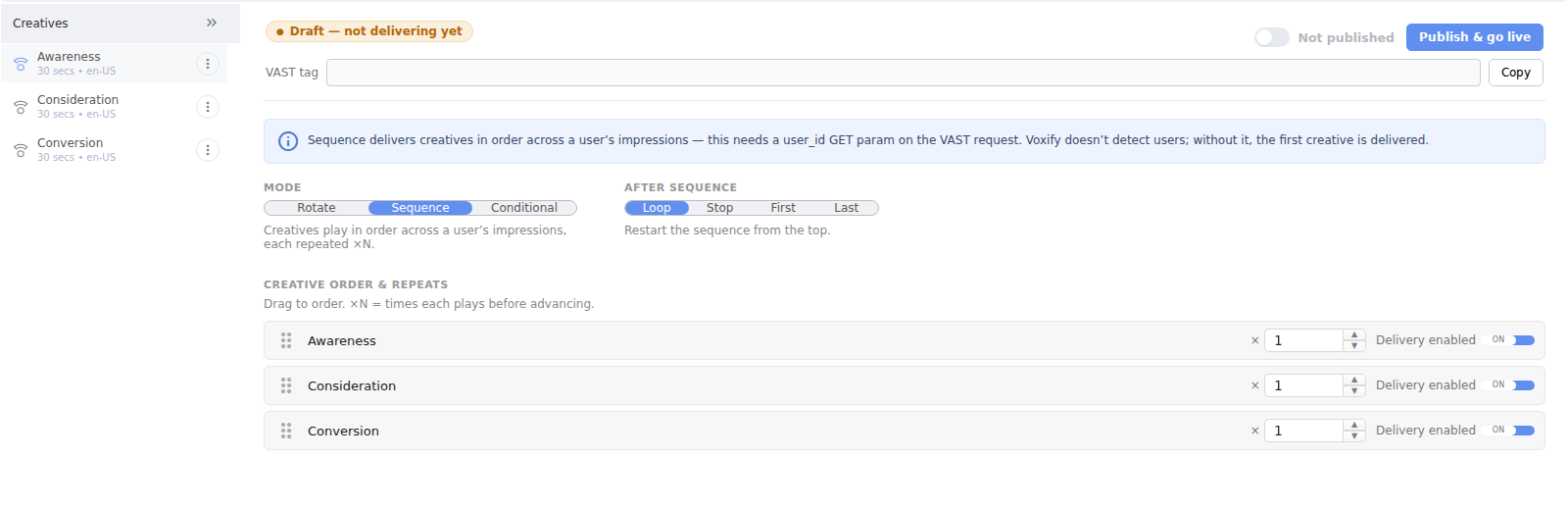
Sequence messages across successive impressions for a recognized user, preserving order and repeat behavior inside one campaign. A simple three-creative project can become a deliberate journey from first contact to action.
  • Awareness: introduce the brand, product or opportunity.
  • Consideration: develop the benefit after the next impression.
  • Conversion: move to the location, offer or call to action.
  • Drag to reorder, repeat individual steps and choose Loop, Stop, First or Last after completion.
Which creative Sequence mode with Awareness, Consideration and Conversion messages

Awareness → Consideration → Conversion, ordered explicitly and kept independent from record selection.

Which creative · Conditional AI

Describe the campaign logic as you would to a colleague.

Choose Conditional, switch to AI and explain the moments or states that deserve different messages. The agent translates the conversation into discrete values, while the operator retains the final mapping from each value to a creative.
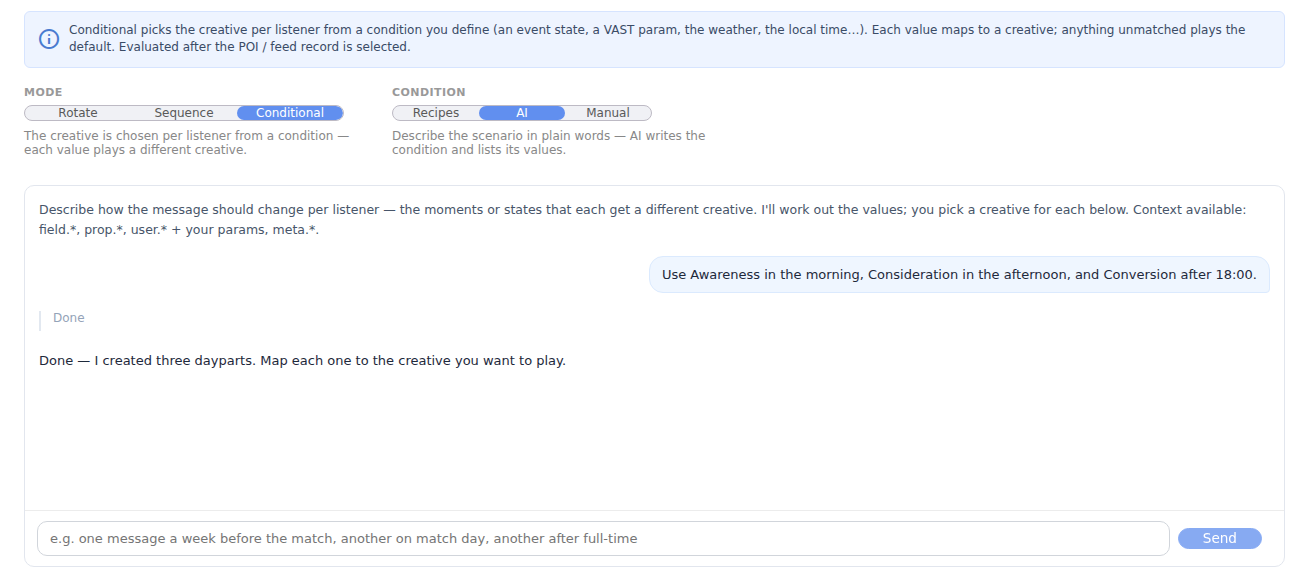
  • Natural-language configuration with multi-turn refinement.
  • Context from POI or feed fields, user parameters and delivery metadata.
  • Values remain visible and map to explicit creative choices.
  • Recipes and a manual expression editor remain available alongside AI.
Conditional Which creative AI conversation translating dayparts into creative selection values

Illustrative dialogue: a plain-language daypart brief becomes values the campaign operator can map to creatives.

Which record

Filter candidates, score them, then control how the winner is picked.

For every POI list or data feed used by the project, create a readable selection policy. Start with eligible records, exclude invalid ones, rank the remainder and choose the winning strategy.
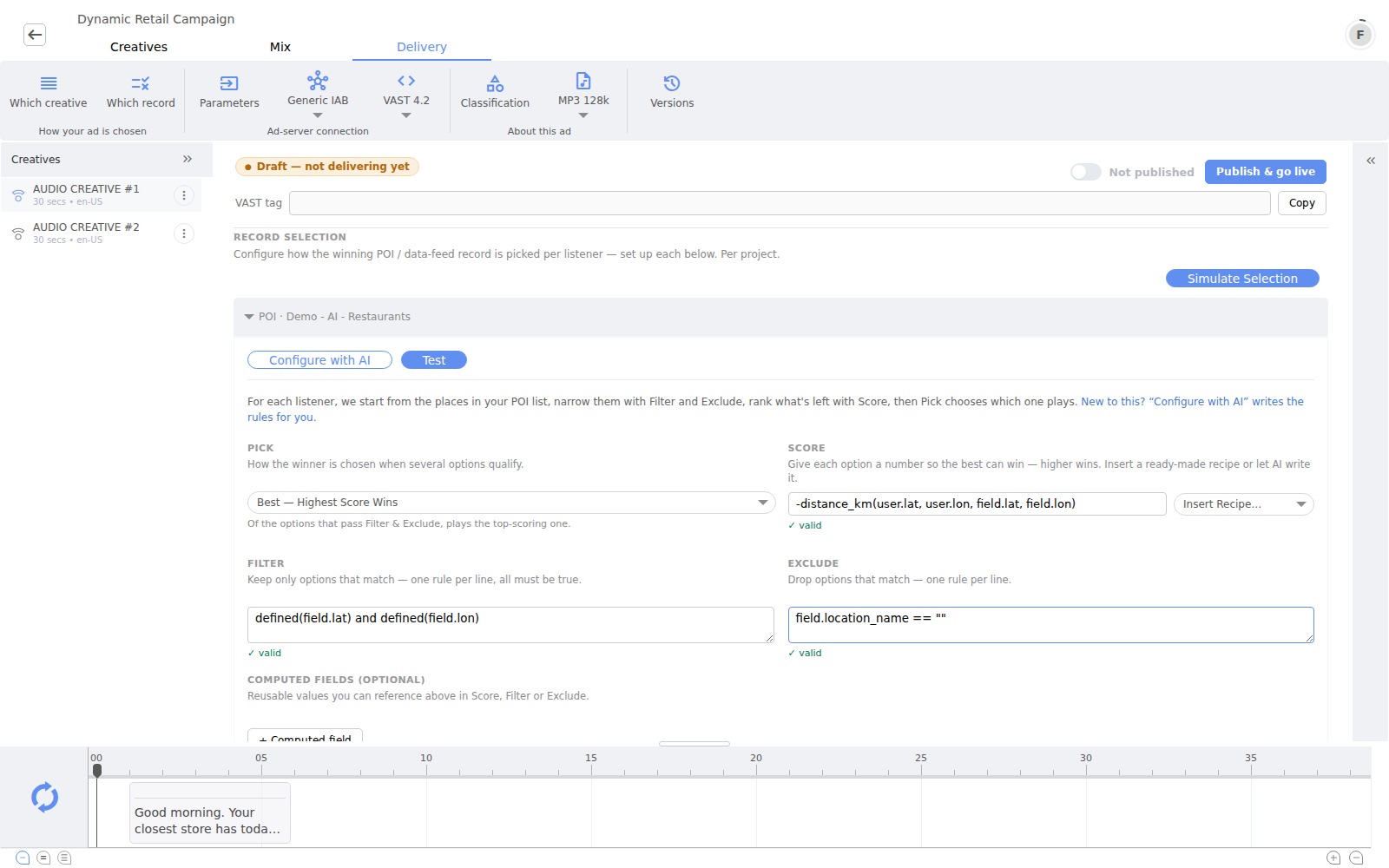
  • Best score, first match, rotation and random Top-N strategies.
  • Ready-made recipes such as nearest POI, plus custom expressions.
  • Computed fields reusable by Filter, Exclude and Score.
  • Configure with AI, Test, Simulate Selection and Pick on Map workflows.
Which record configuration with pick strategy, score recipe, filters and AI assistance

A POI selection policy using distance scoring, explicit filters and testable winner selection.

Which record · Configure with AI

Turn selection intent into an inspectable policy.

For a POI list or data feed, tell the agent what to rule out, what must hold and how the remaining records should rank. The response is not a hidden decision: it is a proposed Filter, Exclude, Score and Pick configuration that can be applied, edited and tested.
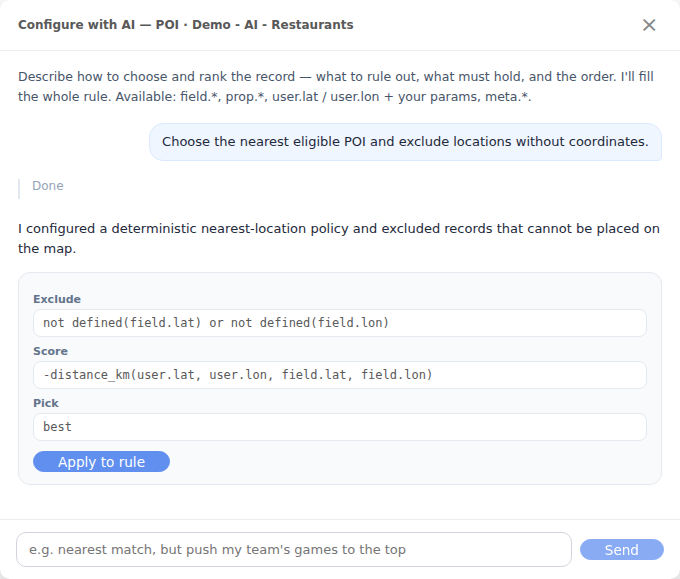
  • Configure nearest-location, eligibility and priority logic conversationally.
  • Use the same approach for POI candidates and live data-feed records.
  • Apply the proposal to the normal rule editor with one action.
  • Test one subject, simulate the whole selection or choose a request location on the map.
Configure with AI conversation proposing Exclude, Score and Pick rules for nearest POI selection

Illustrative dialogue: the agent exposes the deterministic rule it proposes before the operator applies it.

06 · Integrate

Use Voxify directly — or make it part of your product.

The same creative platform supports hands-on teams, guided end users and backend automation.

Voxify Studio

The complete browser workspace for creative teams, sound engineers and campaign operators.

Embedded Editor

A configurable white-label JavaScript component with controlled features, assets and authentication.

REST API

Versioned server-to-server workflows for recommendations, generation and finishing, with asynchronous completion support.

Identifiable by design

Every final AI-generated variant carries two marking layers.

Voxify marks the audio at render time, after the creative and its runtime values have resolved. The result combines signal-level resilience with machine-readable detail that downstream systems can inspect.

  • Audio watermark: an imperceptible signal embedded in the final mix before encoding.
  • Metadata: generator, content type and standardized digital-source descriptors on the deliverable.
  • Public verification: detector results report watermark and metadata independently.
  • Explicit limitations: missing metadata or a negative result is not proof of human origin.

These mechanisms are designed to support the machine-readable marking and detectability requirements in Article 50(2) of the EU AI Act. Applicable obligations remain context-dependent.

Final variantTwo complementary layers
Resolved audioCreative, record, voice, text and assets rendered
Output
Signal watermarkImperceptible mark embedded before final encoding
Audio
Metadata descriptorsMachine-readable origin and content information
File
Independent checksPublic detector reports each layer separately
Verify

See Voxify work with your own script.

Try the guided editor now, or book a conversation about dynamic creative, delivery and integration.