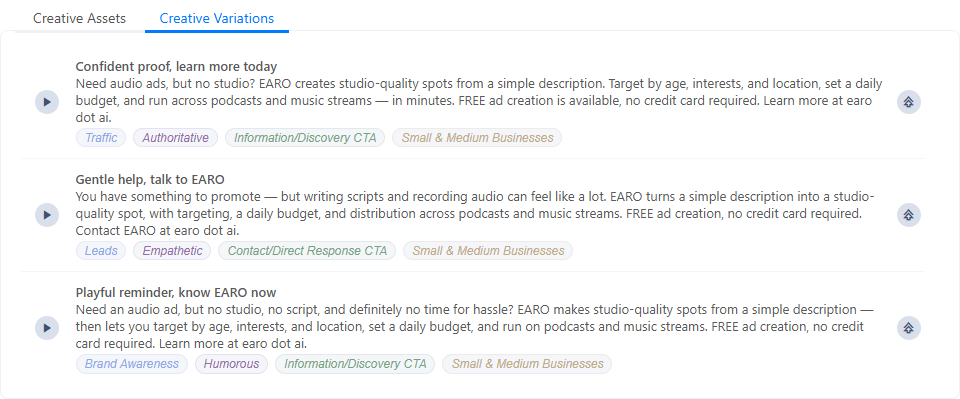
Creative Variations
One script, several takes. Creative Variations spins off alternative versions of the current ad — different objectives and tones — so the user can compare angles instead of committing to the first draft.
What it does
When enabled, it extends Recommend: alongside the matched voices and music, the editor also returns a set of alternative scripts built from the user's current copy — each a different strategic angle on the same product.
Why use it
It's built for A/B testing and creative exploration. Rather than guessing which message lands, the user gets several ready-to-run takes — one leaning on urgency, another on reassurance, another on brand — and can pick, tweak, or test them against each other.
How to enable
Set tools.options.variations to true. It works through
Recommend: with it on, running Recommend adds a
Creative Variations tab next to Creative Assets; with it off, that tab and its generation are
skipped entirely.
tools: {
  options: {
    variations: true,
  },
}
What it returns
Three alternative ad scripts, each a self-contained take the user can play, apply, or refine. Every variation is labelled with classification tags so the strategic difference is obvious at a glance:
- Campaign goal — what the spot is trying to achieve (e.g. Traffic, Brand Awareness, Leads).
- Tone of voice — the emotional register (e.g. Authoritative, Empathetic, Humorous).
- Call to action — the type of CTA (e.g. Information/Discovery, Contact/Direct Response).
- Target audience — who it speaks to (e.g. Small & Medium Businesses, Professionals).
Variations render in the Creative Variations tab: