
Product Brief
Generate finished ad concepts from a short product description — no landing page required. The richer sibling of Webpage: the description field doubles as a creative brief, so the user can steer voice, music, language, and audience in plain words.
What it does
Product Brief is a kickoff tool that turns a product name and description into complete audio-ad concepts — script, voices, and music. It's the right starting point when there's no page to read from yet, or for pitch-driven flows where the user describes the product in a sentence or two.
Why use it
It works from nothing but an idea, and it gives the user more control than a URL can. Because the description accepts free-form creative directions, the user can shape the result up front — ask for a particular voice style, a music mood, a language or accent, or a target audience — instead of only editing afterwards. Great for early-stage products and for users who know the feel they want.
How to enable
Turn on tools.options.byProductPitch — true, or an object to customise the button.
tools: {
  options: {
    byProductPitch: {
      title: 'Product Brief',
      description: 'Generate an audio ad from a product name + description',
    },
  },
}
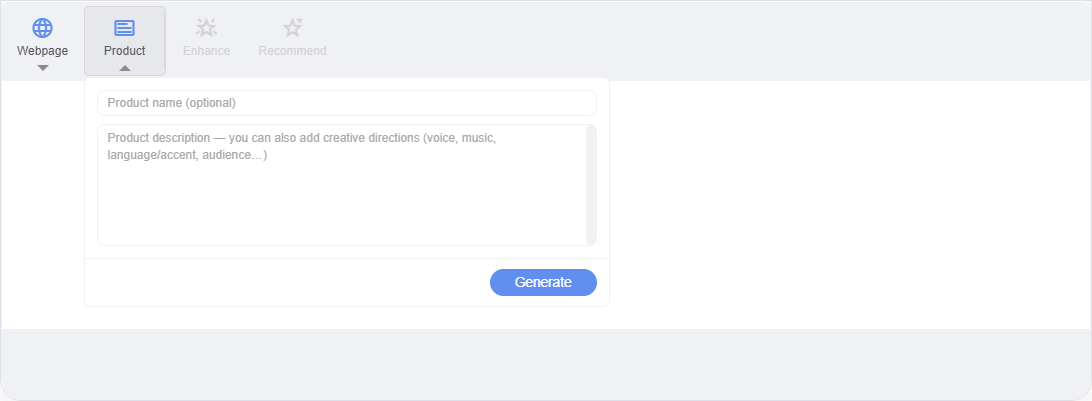
The popover has an optional product name and a description field. The description placeholder spells out the extra power — "Product description — you can also add creative directions (voice, music, language/accent, audience…)". The output language is detected automatically from what the user writes, so a brief written in French produces a French ad.
What it returns
Like Webpage, generation is asynchronous and yields up to three creative concepts — each a distinct take with its own objective, tone, and angle. Every concept includes:
- A finished ad script — ready to play or edit.
- Up to 5 matching voices — ranked to fit the script.
- Up to 5 matching music tracks — chosen to fit the mood.
- Classification tags — campaign goal, tone of voice, call to action, and target audience.
Results render in the Creative Recos panel, and the first concept is applied to the editor automatically (or added as a new creative in multi-creative mode). The output layout is identical to Webpage — see that page's screenshot.